
Home Networking & Wi-Fi Installation in Orange County
Wall to wall, perimeter coverage with full bars everywhere. The network is the backbone of your home's system, the layer every smart home depends on, engineered properly so nothing else in your house has an excuse to fail.
Wi-Fi is what you experience. The network infrastructure behind it is what makes it all work. Every camera, TV, and smart system component in your home depends on a reliable network. This guide explains how we properly engineer a home network, why Wi-Fi fails in well built homes, and the realistic paths to getting it right.
Available options
- Site survey and coverage mapping
- Cable runs and terminations
- Central equipment rack or enclosure with clean cable management and labeling
- Managed network switches for access points and all other devices
- Indoor and outdoor access point installation
- Separate networks for guests, smart devices, cameras, and primary use
- Router setup, firewall rules for security, and remote access
- Speed and roaming verification in every room
1. What a real network is made of
Every system in a modern home runs on your local area network: streaming, video calls, security cameras, lighting control, motorized shades, smart thermostats, home theaters, door locks, and the smart systems that control all of them. When a network is engineered properly, all of it works seamlessly together.
A professional home network should be built the same way any corporate office network is. Below are the seven foundational parts of any network:
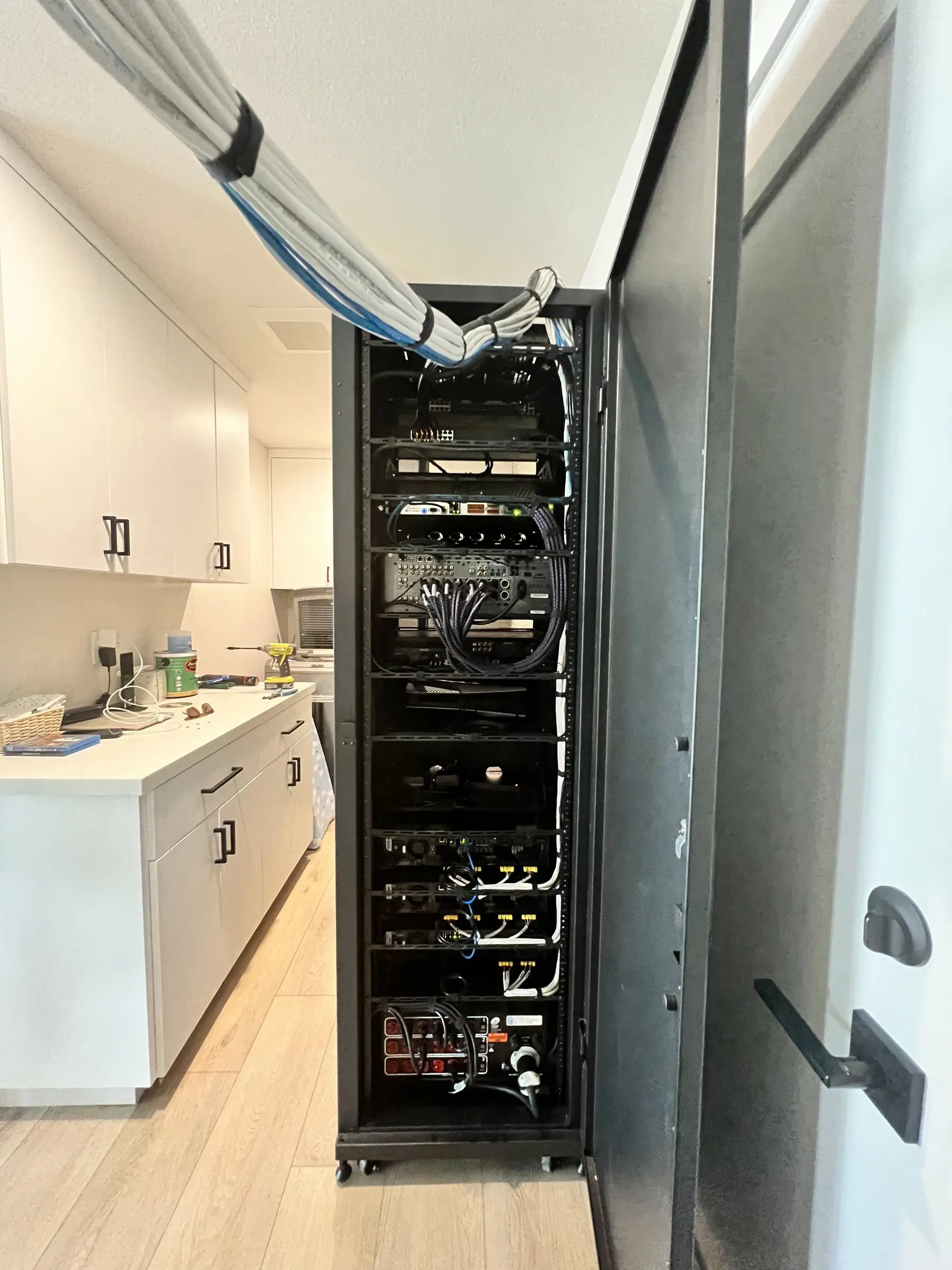
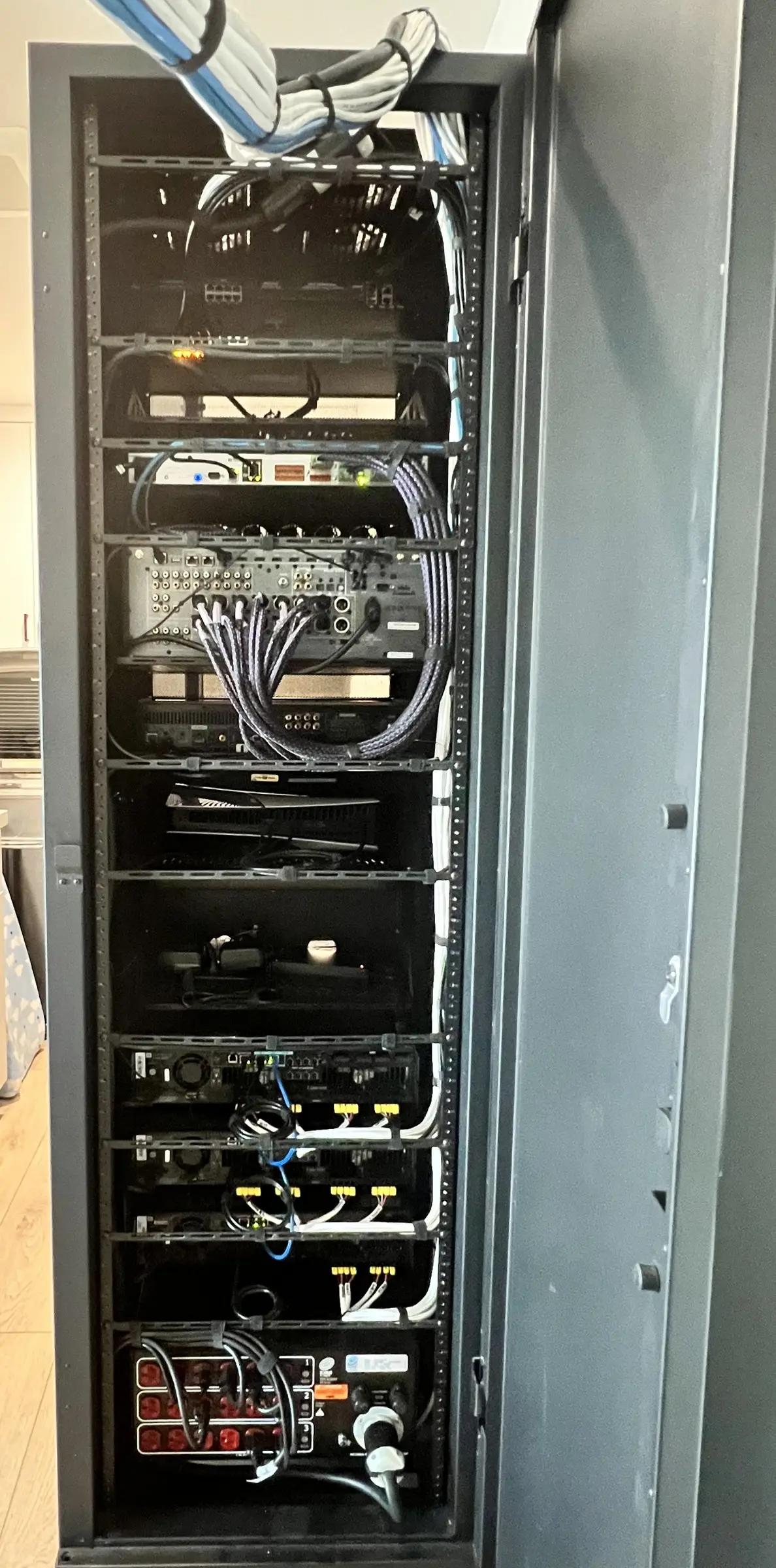
- The equipment rack. One central, well ventilated or air conditioned location where all of your network equipment lives. No more boxes scattered in coat closets or behind television cabinets. An equipment rack allows for clean wire management, where every wire is labeled and easily identifiable. This makes it easy to service the system when failures happen, or to swap equipment when upgrades become available.
- Structured cabling. A physical Ethernet cable that connects every access point, TV, computer, camera, touch panel, and media streaming device to the networking equipment in your rack. A hardwired connection is the most reliable form of connection inside any network.
- Service provider. We prefer fiber when it's available, for its ability to deliver higher speeds. Multiple service providers can be used for internet backup: if Spectrum or Cox has an outage, your secondary service takes over automatically, so you stay connected.
- Router and firewall. A dedicated device that manages traffic and security, replacing the generic all in one box you get from companies like Cox or Spectrum.
- Network switching. Network switches let you connect all of your favorite devices with a physical Ethernet cable, giving them a reliable wired internet connection.
- Segmentation and security. Most home networks clump all of your devices together on a single local area network. Your local area network is the network inside your house, and it includes all of your devices: TVs, cameras, computers, thermostats, and more. A proper network uses virtual networks to separate them: your cameras on one network, your TVs and audio devices on another, your computers and cell phones on another. Devices that need to talk to each other still can, but it reduces the risk of a compromised network and allows for better speeds and a smoother experience.
- Backup and monitoring. Battery backups serve two major functions. If your house loses power during an outage, a battery backup keeps your devices running until power is restored. It also helps protect your equipment from the electrical surges that can happen when power is lost and restored. Remote monitoring lets us spot problems before you notice them.


Wi-Fi sits on top of all of this. Wireless access points are the last step. Connected to your network switch with a hardwired Ethernet cable, they provide all of your Wi-Fi devices with wall to wall, reliable coverage.
2. Why Wi-Fi fails in good homes
Most Wi-Fi problems in Orange County homes have nothing to do with the internet plan. The plan is usually fine. The problem is everything between the modem and your devices.
The router is in the wrong place, doing the wrong job
Your internet provider installs its router wherever the cable enters the house, which is usually a garage wall, a closet, or a corner of the house. That one box is asked to cover every room, both floors, and the yard. It was built for a price point, not to cover 4,000 square feet.
Your walls are working against you
Some of the most common construction in Southern California is also the hardest on Wi-Fi:
- Stucco. Exterior stucco is applied over a metal mesh that behaves like a shield. It is a big reason the signal dies at the back slider.
- Low E windows. Energy efficient glass has a metallic coating that reflects heat, and it reflects Wi-Fi too.
- Tile, stone, mirrors, and concrete. Kitchens, bathrooms, and fireplaces are dense. A signal that crosses several of them arrives weak.
- Multiple floors. Floors and ceilings with ductwork, plumbing, and steel cut the signal more than most walls do.
Weak signal doesn't just mean slow. It slows everyone down
When a device has a weak signal, it drops to a slower connection rate and takes longer to send the same data. While it does that, every other device waiting on that access point waits too. One struggling TV in the back bedroom can make the whole network feel sluggish.
Wi-Fi extenders and mesh systems hit a ceiling
Plug in Wi-Fi extenders are rarely a reliable solution. An extender picks up the signal from your router and rebroadcasts it to another part of the house. A mesh system is a set of units sold together and designed to work as one network, which is a step up, but most mesh units still connect to each other over Wi-Fi. That means they act like extenders and have the same problem: the airwaves your devices need for signal are also being used to extend your Wi-Fi. Every extender or mesh unit you add gets weaker the farther it is from the main unit.
Today's homes have far more devices
Phones, laptops, TVs, cameras, thermostats, speakers, doorbells, lighting, appliances, and cars. A connected home can easily have 50 to 100 or more devices on the network. Consumer routers were not designed to manage that many at once.
How proper infrastructure fixes it
Instead of one box trying to cover the whole house, small ceiling mounted access points are placed where a coverage survey says they belong. Each one has its own cable wired back to the network switch in the rack, so none of them are wirelessly connected like extenders or mesh units. Every access point delivers full speed to the area it covers.
Done properly, you will have full bars everywhere, video calls that don't drop when you walk between rooms, and a system that stays reliable regardless of what devices you add in the future.
3. Three paths to a network that just works
There are three realistic paths. Which one fits depends on your home, what's already in the walls, and whether construction is planned.
4. What drives the cost
Every home is different, but a few things move the budget more than anything else:
- Number of access points. Driven by square footage, number of floors, construction materials, and how much of the yard you want covered.
- How hard the cable runs are. A single story with an open attic is straightforward. Two stories with finished ceilings and no attic access take more labor.
- Outdoor areas and detached buildings. Pools, patios, casitas, and guest houses need outdoor rated equipment and sometimes a dedicated link between buildings.
- Equipment grade. Professional grade equipment costs more up front and lasts longer, with better management and support.
- Extras. Backup internet (cellular or satellite), battery backup for the network, and ongoing monitoring through a service plan.
What doesn't matter as much as people think: your internet speed plan. Upgrading from 500 Mbps to 2 Gbps does nothing for a dead zone. Coverage is the network's job, not the provider's.
5. How to tell what you need
A 5 minute test you can do today: run a speed test standing next to your router, then in the room where Wi-Fi is worst.
- Fast near the router, slow in the far room: it's a coverage problem. That's exactly what a wired access point fixes.
- Slow everywhere, even next to the router: the issue is the internet line or the router itself. Start with your provider. New Wi-Fi alone won't fix it.
- Fast in both places, but things still drop: usually congestion, roaming, or too many devices on a consumer router. A properly configured network fixes this.
Questions to think through before a walkthrough
- Which rooms and outdoor areas have weak or no signal?
- Is there network cable in the walls today, and where does it end up?
- How many people work from home or take video calls?
- Do you use the patio, pool, or a casita, and do you want Wi-Fi there?
- Are cameras, smart lighting, or automation planned in the next year or two?
- Is a remodel or addition coming up? If so, plan the network with it.
Home networks we've installed
Real projects, photographed on site. Tap any photo to see it larger.
How we do it
Every network starts with a plan: where the equipment will live, where cables can be run, what devices will be used, and a coverage survey to identify how signal will interact with the walls and materials in your home. Then we build the infrastructure, place access points where the survey suggests, and test speeds room by room for optimal performance.
Engineered as infrastructure
A central rack, structured cabling, and professional switching and security, designed to carry every device in the home.
Surveyed, not guessed
Placement comes from real data.
Hardwired everywhere
Every access point has its own Ethernet cable. No plug in extenders or wireless mesh.
Outdoors too
Patio, pool, driveway, and casita coverage with outdoor rated equipment built for longevity.
Segmented for security
Family, guests, cameras, and smart devices all on separate networks.
Seamless roaming
Walk through your entire house without losing your connection.
Remotely monitored
We often spot and fix problems before you even notice them.
From first walkthrough to a system you actually use
Big projects go wrong when nobody explains what happens next. Here is exactly how a project runs, start to finish.
- 01
Consultation
Whether you have an existing home or are building a new space, our unique line of questioning draws out your lifestyle and how you'll actually live in the space. From there, we establish how we can enhance your home and optimize the living experience.
- 02
Design & proposal
You get a designed system with a written proposal: what goes where, what it does, and what it looks like. Theaters include a 3D model, so you see the finished room before anything is built.
- 03
Installation
We work with your builder, electrician, and designer to ensure a smooth, cohesive execution. Cables are run neatly and properly, speakers are placed precisely in relation to lights and other fixtures, everything is straight and level, and racks are built to be serviced. The job site is left better than we found it.
- 04
Programming & calibration
Scenes are built around your routine and customized for the time of day. Video is calibrated to show what the director intended you to see. Audio is measured and tuned for peak performance. It's a step many rush through; we take our time.
- 05
Training & support
We sit down with you and everyone in the household to make sure everyone knows how to drive it. Then we stay reachable with remote monitoring and support, because sometimes things get forgotten.
Guides worth reading first
Straight answers we'd give you on a walkthrough, written down.
Why Your Smart Home Keeps Dropping Offline (And How to Actually Fix It)
Cameras dropping, a thermostat that stops responding, buffering upstairs? It's almost never the devices. It's the network under them. How to tell.
Read the guideSmart Home Prewire: What to Get Right Before the Drywall Goes Up
The low voltage choices made before drywall decide what your house can do for 20 years. A prewire checklist for Orange County builds and remodels.
Read the guideNetworking and Wi-Fi questions, answered
Straight answers to what people actually ask before starting a project like this.
Why not just buy a mesh system?
Mesh works acceptably in a small, open, single story home. But most mesh units connect to each other over Wi-Fi, which makes them work like extenders. In a larger two story house with stucco and tile, the wireless links between nodes use up a large share of the available bandwidth, and it gets worse the more nodes you add. Hardwired access points don't have that ceiling.
Can you run network cable in a finished house?
Usually, yes. Attics, crawlspaces, closet stacks, and existing chases give us paths in most Orange County homes. We walk the house first and show you exactly where cable can run cleanly, and where we'd suggest a wireless bridge instead of opening finished drywall.
Will this fix my streaming and video call problems?
If the cause is coverage, congestion, or interference, yes. That's exactly what it addresses. If your internet plan is the real limit, we'll tell you plainly and point you to the right fix instead of selling hardware that won't help.
Do I need this before automation and cameras?
It should come first, or at least at the same time. Cameras, streaming, control systems, and touchscreens all depend on the network. A weak network is the most common reason smart homes feel unreliable.
What about coverage at the pool and backyard?
Outdoor rated access points handle it. We regularly cover patios, pools, casitas, and driveways so the signal doesn't stop at the back door.
Do I need Wi-Fi 7?
For new installs it's worth considering. Wi-Fi 7 adds the 6 GHz band and wider channels, which help in busy homes. But 6 GHz signals are shorter range and weaker through walls, and most devices in a home today still use older Wi-Fi standards. Placement and wiring matter far more than the Wi-Fi version on the box. A well placed Wi-Fi 6 network beats a badly placed Wi-Fi 7 one.
Do I still use my internet provider's equipment?
No. We replace your provider's modem and router with professional grade equipment. It performs better, and you stop paying the monthly equipment lease fee.
What happens if the internet goes down?
Everything inside the house that doesn't need the internet keeps working on the local network. With optional backup internet (cellular or satellite), the network switches over automatically so cameras, alarms, and remote access stay online until the main line is back.
What clients say
“I had the pleasure of working with Ashkan on multiple AV installations in the past 10+ years. His team performed a complete update of the media room which includes a multi-screen projection home theater, music server, whole house audio, dedicated 2Ch HiFi system, as well as Crestron automation for AV, lighting & shades. The most recent project is a second HT AV system for the family room/kitchen remodel. It's a complex installation & we're very happy with the job. Ashkan is always professional, responsive & reliable with excellent after sales/installation supports. Highly recommended.”David NgOrange County · Home theater & whole house audioVerified Google review
“I have worked with Ashkan Baghaee for over seven years. He and his team installed and since have maintained the AV, WiFi, and camera systems at our house. They at all times have been effective, professional, and responsive. I have recommended Ashkan to numerous neighbors, friends, and relatives, and those who have worked with him have provided very positive reports. I will continue to recommend Ashkan to anyone in need of his services.”Don DickersonOrange County · AV, Wi-Fi & camerasVerified Google review
“I have worked with Ashkan for 3-4 years. He did a extensive AV job on our Newport Beach home. He did a great job. In addition, as with any extensive AV job/project they'll be a need for follow up. Ashkan has always made himself available and been quick to help with any AV issues. A Pro from start to finish and he will stay with you to make sure your happy. Highly recommend”Mike MNewport Beach · Whole home AVVerified Google review
Get a real proposal for your networking & Wi-Fi project
Three quick questions and we'll come back to you within one business day. No obligation, and no pressure if the timing isn't right.
- On site walkthrough of your space
- Written proposal you can compare line by line
- Honest scope, including what to skip
Home networks across Orange County
Every city on this list has its own installation realities: coastal corrosion, canyon access, estate lot distances. Find yours.
Systems that belong together
Smart Home Automation
One system that runs your lighting, climate, audio, video, shades, cameras, and entertainment, controlled from a touch panel, a keypad, your phone, or your voice, from anywhere in the world.
Learn moreSecurity Cameras
Camera systems designed around real coverage: approach paths, entry points, and blind spots, with recording you own, viewable from anywhere in the world, and optional face recognition that alerts you when a stranger is on your property.
Learn moreHome Theater
The art of cinema, in your own home. A private theater designed, engineered, and calibrated so the room disappears and the movie is all that's left.
Learn moreLet's design something worth living with.
Free consultation, no obligation, and a written proposal you can actually compare. We'll walk your space and tell you honestly what's worth doing.